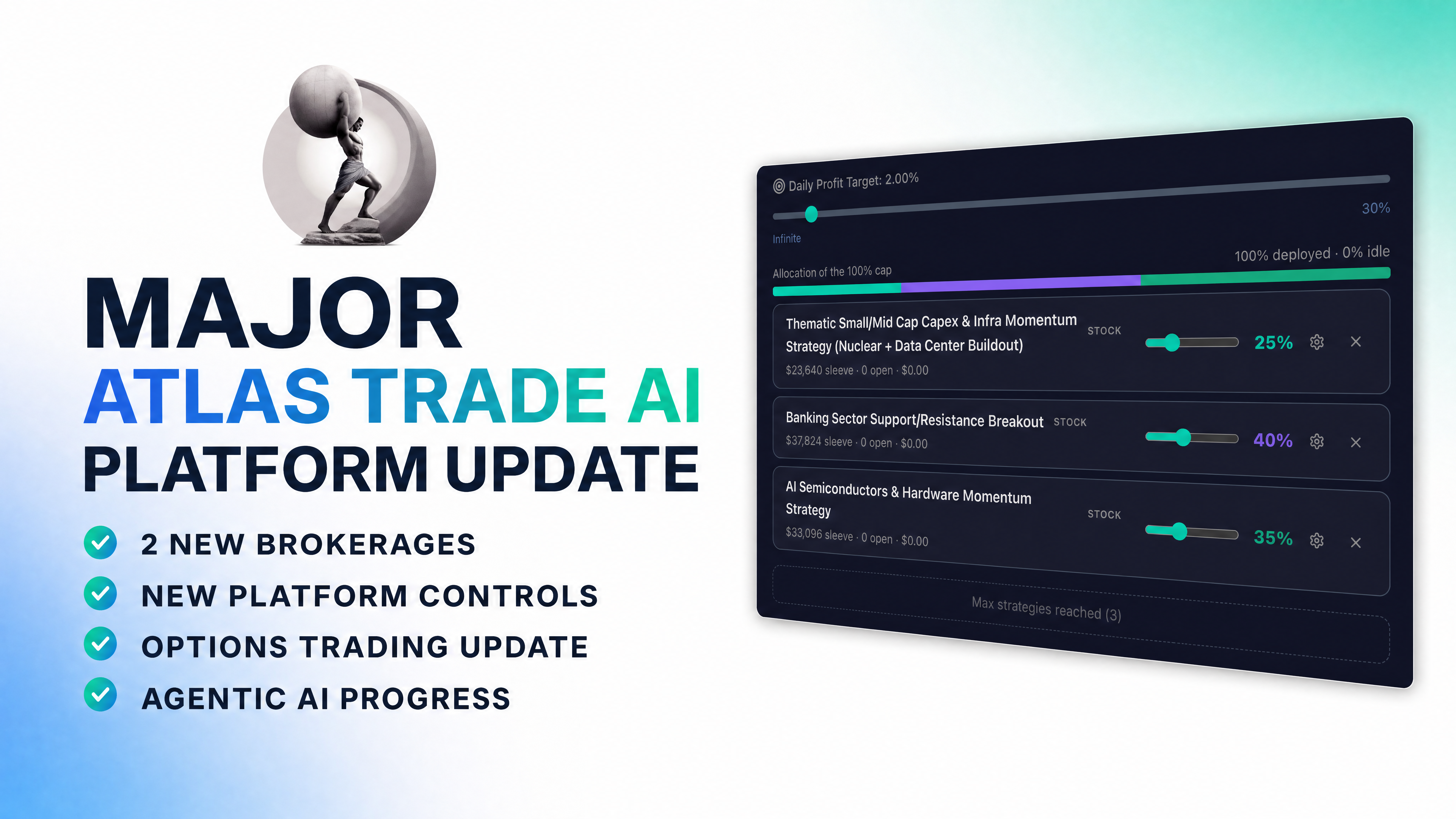
August 2026
See what has changed across Atlas.
The latest update covers multiple strategies per connected account, Daily Take Profit, expanded brokerage compatibility, improved platform visibility, and technology currently in development.
Atlas Answer Center
Explore how Atlas Trade AI works with supported brokerages, how strategies and platform controls operate, what each access plan includes, and what to review before activating automation.
August 2026
The latest update covers multiple strategies per connected account, Daily Take Profit, expanded brokerage compatibility, improved platform visibility, and technology currently in development.
Find Your Answer
Use the filters or search above to narrow the page. These answers summarize current public information as of August 24, 2026. Your order form, platform prompts, brokerage terms and the Atlas Legal Center control where applicable.
Atlas Trade AI is self-directed trading-automation software designed to connect user-selected strategies and settings with supported U.S. brokerage accounts.
You select the supported brokerage account, available strategy, allocation and platform controls, then decide whether to activate automation. Once activated, Atlas software can generate and transmit order instructions under that setup without asking for approval before every order. The connected brokerage remains responsible for accepting or rejecting orders, executing accepted orders, custody, clearing, margin and official account records.
Algorithmic trading uses computer-defined logic to generate trading decisions or order instructions when specified conditions occur. Those conditions can relate to price, timing, volume, indicators, market data or other defined inputs. Automation can make a process more consistent, but it does not eliminate market, technology or execution risk.
When you activate an automated strategy, Atlas can generate, transmit, modify or cancel orders in accordance with the strategy and settings you selected without contemporaneous approval for each trade. You remain responsible for monitoring the connected brokerage account and deciding whether to keep automation active, pause it, change the setup or disconnect it.
No. Your cash and securities remain in your own connected brokerage account. Atlas does not act as your custodian and cannot withdraw or transfer your brokerage assets. Amounts paid to Atlas are software licensing and service fees, not brokerage deposits or trading capital.
You do. Atlas provides the software, available strategy information and product support, but it does not determine which strategy, brokerage, security, allocation, account type or risk setting is appropriate for your personal circumstances. Support can explain how the platform works; it does not provide individualized investment advice.
The currently released Atlas strategy experience is centered on automated U.S. equities strategies through supported brokerage connections. The specific securities, sectors, trade frequency and holding behavior vary by strategy.
Options Trading and Agentic Trading technology remain under development unless Atlas expressly identifies them as released for your account. Futures functionality is not currently offered.
You can register online or schedule a private demonstration. Setup generally includes creating your Atlas account, reviewing the current terms and risk information, connecting an eligible brokerage account, selecting an available strategy and configuring the settings you choose.
Timing can vary based on brokerage-account approval, permissions, connection availability, identity checks and the information needed for onboarding. Atlas does not guarantee a universal setup time.
As of August 24, 2026, Atlas lists eight supported U.S. brokerage connections: Charles Schwab, Robinhood, TradeStation, Alpaca, Tradier, Webull, tastytrade and Public.
Compatibility, connection method, account eligibility and available functionality can vary by brokerage and account type. Review the current Brokerage Directory and the options shown during onboarding before opening or connecting an account.
Supported account types vary by integration. The current directory includes eligible individual or basic trading accounts, cash and margin-designated accounts, paper or simulation environments, Traditional IRAs, Roth IRAs, Rollover IRAs and the Robinhood Agentic Cash Account in the specific combinations shown for each brokerage.
A brokerage's own terminology, approval, permissions and account rules continue to apply. Availability of an account label does not mean every Atlas feature is available through that account.
One connection means one specific brokerage account, not unlimited accounts at one brokerage firm. For example, an Individual account and a Roth IRA are two separate connections even if both are held at the same brokerage. A live account and a paper account are also separate accounts.
Yes, when you have the required account-connection access and each account is supported. Flex and Premium each include one connection as standard. Additional account connections are currently available for $3,500 each through the Atlas platform.
Each connected account remains separately subject to brokerage eligibility, permissions, strategy availability and technical compatibility.
Atlas does not publish one universal minimum that applies to every brokerage, account type and strategy. Atlas may show technical or strategy-specific minimum information during onboarding or inside the platform, while your brokerage determines its own account, margin, settlement and trading requirements.
Use current information. Do not rely on an older universal $25,000 pattern-day-trading statement. Day-trading and intraday requirements can vary by brokerage, account and the rules in effect at the time.
Connect only a supported account that is free of positions and open orders you want to keep. Completing a supported brokerage connection is designed to transmit requests to close existing open positions. Closing positions can realize gains or losses, create tax consequences and incur fees, spreads or slippage.
Brokerage acceptance, execution, timing and price are not guaranteed. Review the brokerage account before and immediately after connecting, and maintain direct access to the broker.
Atlas is designed to use brokerage-approved connection methods. Depending on the integration, this may include OAuth, API keys or other delegated credentials. OAuth can reduce the need for Atlas to receive a brokerage password, while tokens and API keys still require appropriate protection.
Atlas uses security controls designed for its systems and data, but no online system can be guaranteed completely secure, uninterrupted or immune from compromise. You should protect your Atlas and brokerage accounts, use available multi-factor authentication and monitor activity independently.
Atlas provides the software layer used to configure automation, process strategy signals and transmit supported order instructions. Your connected brokerage controls account approval, custody, order acceptance or rejection, routing, execution, clearing, margin, brokerage fees, statements, tax forms and the official account record.
A signal generated or order transmitted by Atlas is not the same as a brokerage-confirmed fill. Always verify order and position status directly with the brokerage.
Atlas is designed around supported U.S. brokerage accounts. Whether you can open, maintain and connect an account can depend on your location, the brokerage's eligibility rules and applicable law. Atlas does not currently advertise compatibility with proprietary trading firms; it connects to the supported brokerage accounts shown in the Brokerage Directory.
Yes. Eligible connected accounts can currently run up to three strategies. You select the strategies and assign the percentage allocation you want for each one, subject to the allocation limits and compatibility displayed in the platform.
Multiple strategies can change the way account exposure is distributed, but using more than one strategy does not ensure diversification, profit or protection from loss.
Daily Take Profit is an account-level setting that lets you select a daily target for a connected brokerage account. If the selected target is reached, trading can be paused for the remainder of that trading day. The control is configured separately for each account.
Selecting Infinite means the account will not pause because of a predetermined Daily Take Profit target. This setting is a user-selected control, not a promised profit target, and market movement or execution can cause actual results to differ.
Available controls can include strategy allocation, account-level drawdown or Daily Take Profit settings, and strategy-specific parameters shown in the current platform. The exact controls can vary by strategy version, brokerage connection, account type and feature availability.
Review the setting description and confirmation presented in the platform before activation. Controls are designed to help manage how the software operates; they do not guarantee a particular fill, profit or maximum loss.
Yes. You can review and change the strategies assigned to a supported connected account through the current Sync Algos to Brokerages workflow. Before switching, read the platform confirmation carefully and verify whether positions or orders remain at the brokerage.
A strategy change may involve transmitting exit instructions, but exposure can continue until the brokerage accepts and executes the relevant order. Do not assume a software change means positions are already closed.
These controls can have different effects depending on the platform workflow, strategy and brokerage connection. One action may stop new strategy activity, while another may be designed to transmit instructions relating to open orders or positions.
Use the explanation and confirmation shown at the time of the action, then verify the resulting order and position status directly at the brokerage. If the intended effect is unclear, contact Atlas support before proceeding.
You retain direct access to your brokerage account and can use the broker's tools. However, manually changing positions while Atlas automation remains active can create conflicts with the strategy's next order instructions. Depending on what you are trying to do, pause or disconnect the relevant automation first, review the on-screen workflow and monitor both Atlas and the brokerage.
Yes. Trading frequency, signal timing and holding periods can differ by strategy, and some strategies may hold positions overnight. Review the current strategy profile, symbols, available historical information and operating description before activation rather than assuming every strategy trades the same way.
Currently available Atlas equities strategies are not designed for short selling unless the applicable strategy profile and activation disclosures expressly state otherwise. Short selling has separate borrowing, margin and potentially unlimited-loss risks and should never be inferred from general references to automated equities trading.
Atlas provides strategy information intended to help you understand the available technology before activation. Depending on the strategy and platform view, this can include a plain-language description, symbols, current version information, trade history and performance or backtest information.
This information supports informed self-directed selection; it is not a recommendation or guarantee. Brokerage statements remain the official record of actual account activity.
Automated trading depends on software, market data, internet connectivity, cloud services, brokerage APIs and brokerage systems. Any of those components can be delayed, interrupted or unavailable. Orders may be rejected, duplicated, delayed, partially filled or left in an uncertain state.
Maintain direct access to your broker, monitor the official brokerage account independently and do not rely on Atlas as your only way to view or manage exposure.
Review the current Pricing page and the terms presented at enrollment before purchasing.
Flex provides a substantially lower upfront entry point with a higher ongoing monthly platform fee and the ability to add supported advanced capabilities separately. Premium has a higher upfront software-access fee, a lower monthly platform fee and specified future advanced-technology access included upon release.
Flex is a separate access structure, not a discounted Premium plan.
Under Flex, Agentic Trading and Options Trading technology are available separately as paid add-ons when those supported capabilities become available. Premium includes access to those technologies upon release as part of the plan.
“Upon release” is important: it describes future access, not current availability. Release, account eligibility, brokerage support, activation requirements and exact functionality remain subject to the conditions communicated by Atlas at that time.
No. The current pricing structure treats Flex as a separate path. The $2,495 Flex upfront payment is not credited toward the $9,995 Premium upfront fee. A Flex client can instead purchase supported add-ons under the applicable Flex structure when those add-ons are available.
After a qualifying private demonstration, an eligible prospective client may receive a separate Private Enrollment offer. If issued, that specific offer remains available for 48 hours under the terms provided with it.
The 48-hour window applies only to that optional offer. It is not a deadline on standard Flex or Premium pricing, and exact Private Enrollment terms are provided after the demonstration when applicable.
No. Upfront and monthly amounts paid to Atlas are software licensing and technology-access fees. You separately fund and maintain your connected brokerage account. Atlas does not receive those brokerage funds as a deposit or manage them as investment capital.
Atlas uses Stripe for software-payment processing and provides account-management controls through the platform. The checkout or order form should show the applicable upfront amount, recurring amount, billing frequency and authorization before purchase.
Cancellation, the effective end of access, renewal and any refund eligibility are governed by the written terms presented with your enrollment and the current Dispute, Cancellation and Refund Policy. A refund right is not created unless it is included in the applicable order or required by law.
Atlas cannot predict the result you will experience. Actual results can vary materially based on the strategy version, configuration, allocation, brokerage, fees, deposits and withdrawals, market conditions, execution, slippage, liquidity, outages, taxes and the period traded.
Review performance information in context and do not use a historical, recent, simulated or backtested result as a promise of future performance.
No. Trading securities and automated trading involve substantial risk of loss, including loss of principal. No strategy, backtest, risk setting, automation or AI feature guarantees profit, outperformance or protection from loss. Automated trading can make decisions and transmit orders faster, but it cannot remove market or technology risk.
Backtested or simulated results apply strategy rules to historical or modeled data; they are not actual customer trading. They can benefit from hindsight, selected data and assumptions and may not fully reflect spreads, slippage, liquidity, fees, market impact, rejected orders, outages, borrowing, taxes or the practical ability to continue trading through losses.
They can be useful for studying how logic behaved under a model, but they do not predict future results.
An actual live result should identify the account or composite, period and methodology it reflects. It may not represent customer results generally. Different settings, strategy versions, account sizes, fees, deposits, withdrawals, taxes and market conditions can produce different outcomes. Past live performance is not indicative of future results.
No. These controls are designed to influence how the software responds, but they cannot guarantee execution at a selected price or a fixed maximum loss. Market gaps, volatility, liquidity, halts, slippage, delayed data, outages, partial fills, rejected orders and brokerage rules can cause a different result.
Atlas strategies are designed for 1:1 leverage, and compatibility with a margin-designated account does not mean leverage is required or recommended. If an available control permits margin, choosing to enable it is your decision and remains subject to the brokerage's approval and rules.
Day-trading, buying-power and intraday requirements can vary by brokerage, account and current regulation. Review the broker's current requirements rather than relying on an older universal balance statement.
Atlas is a software and technology provider; it is not a bank, custodian, broker-dealer or investment adviser. Platform and support information is general product and software-use information, not individualized investment, legal, accounting or tax advice.
Trading activity occurs in your brokerage account, and the brokerage provides the official account records and tax forms. Consult your own qualified professional for advice specific to your circumstances.
Oculus Algorithms is Atlas's proprietary AI-assisted strategy-building technology. It is designed to let a user describe a trading concept in plain English, translate that concept into quantitative logic, run historical backtests, review an explanation of the strategy and support deployment through compatible ecosystem workflows.
Oculus is a strategy-development tool, not a guarantee that a concept will be viable or profitable. Current access, usage allowances and deployment options are governed by the applicable account and platform terms.
Oculus is designed around a natural-language workflow, so a user can describe a market concept without writing code. Its current public site also describes an advanced workflow for users who want more direct control over strategy design. Clear prompts and careful review are still important; “no coding required” does not mean no judgment or testing is required.
A strategy-building iteration may fail to meet the return, drawdown or other parameters requested by the user. Oculus can record the result and support another iteration or refinement, but it cannot guarantee that repeated optimization will discover a profitable or robust strategy.
Repeatedly optimizing against historical data can increase overfitting risk. Any displayed backtest remains hypothetical and should be evaluated under the applicable performance disclosure.
Existing strategies can use AI during research, development, testing or optimization while still operating through defined logic, inputs and signals. Agentic Trading is being developed as a broader system that may evaluate information, form objectives, plan multi-step actions and act through connected tools or APIs under a defined authority framework.
That distinction is why references to AI-powered strategy development should not be read as a statement that currently released strategies already provide the future Agentic Trading experience.
Options Trading and Agentic Trading are under development unless Atlas expressly identifies them as released and available for your account. Availability may depend on the plan, add-on purchase, brokerage, account type, eligibility, technical readiness and completion of applicable legal requirements.
Futures or other commodity-interest functionality is not currently offered. Roadmap references describe intended development and are not a promise of a particular release date, feature set or brokerage compatibility.
Atlas provides product and account-configuration support through the current in-platform options, which can include support scheduling, ticket submission and Veridian Core for platform guidance. You can also contact [email protected].
Support can explain available features, strategy information and software workflows. It does not choose a suitable strategy for you or provide individualized investment, legal or tax advice.
Read The Latest Atlas Trade AI Platform Updates — and What Is Coming Next for the detailed August 2026 release overview, or watch the concise 4-minute platform update video. The Video Library and Atlas Blog contain additional walkthroughs and updates.
Clients can use the Atlas Platform Knowledge Base for current platform instructions and the Oculus Knowledge Base for Oculus-specific guidance. Because platform interfaces and workflows can change, the instructions visible inside the applicable account should be treated as the current operational source.
The Atlas Legal Center contains the current Terms of Service, End User License Agreement, Trading and Automation Risk Disclosure, Margin and Intraday Risk Disclosure, Performance and Backtesting Disclosure, Privacy Policy, Security Overview, Billing and Renewal Policy, and Dispute, Cancellation and Refund Policy.
This FAQ is a plain-language product resource. The applicable order form, accepted agreements, platform acknowledgments, brokerage terms and Legal Center documents control if there is any conflict.
Try a shorter phrase such as “brokerage,” “pricing,” “Daily Take Profit” or “backtest,” or clear the current filter.
Walk through the platform, supported brokerage connectivity and the difference between Flex and Premium with a member of the Atlas team.
Schedule a private demoReview current how-to guidance for account connections, strategy configuration, platform controls and account management.
Visit the knowledge baseReview the controlling agreements, trading and automation risks, performance disclosures, billing terms and privacy information.
Explore the Legal Center